Visualizing Color Segmentation in Image Processing
Introduction
Have you ever wondered how technology can isolate specific colors in a digital image or even identify weeds among crops? Over the past three years, I’ve been working with image processing, focusing on segmentation and object detection to solve challenges like weed detection in crop fields. A critical part of this work is understanding and visualizing data in a meaningful way. In this post, I’ll explain the essentials of color segmentation in the RGB color space and show you how an interactive 3D visualization can bring this concept to life.
The RGB Color Space
Most digital images are composed using the RGB color space, which combines three primary channels: red, green, and blue. In an 8-bit system, each channel ranges from 0 to 255, creating over 16 million possible color combinations. Imagine this as a 3D cube, where each axis corresponds to one color channel. This visualization helps us understand how colors are distributed in an image.
Color Segmentation Basics
Color segmentation is the process of isolating specific colors by analyzing the RGB values of each pixel. A common approach is to compute a weighted sum of the red, green, and blue channels. By assigning different weights to each channel, you can emphasize one color over the others, effectively highlighting the desired hues in the resulting segmented image.
The Excess Green minus Red Algorithm
One effective method for emphasizing green vegetation—widely used in agriculture—is the Excess Green minus Red (ExG-R) algorithm. Its formula is straightforward:
ExG-R = 2G - R - B
In this equation, R, G, and B represent the red, green, and blue values of a pixel, respectively. Doubling the green component and subtracting the red and blue values accentuates green shades, making it ideal for tasks like spotting weeds or crops. (For more details, see Meyer et al. 2004.)
After calculating this weighted sum, the resulting values span both negative and positive ranges. By applying a threshold of 0, you can effectively separate the pixels into vegetation and non-vegetation classes.
Visualizing Color Segmentation
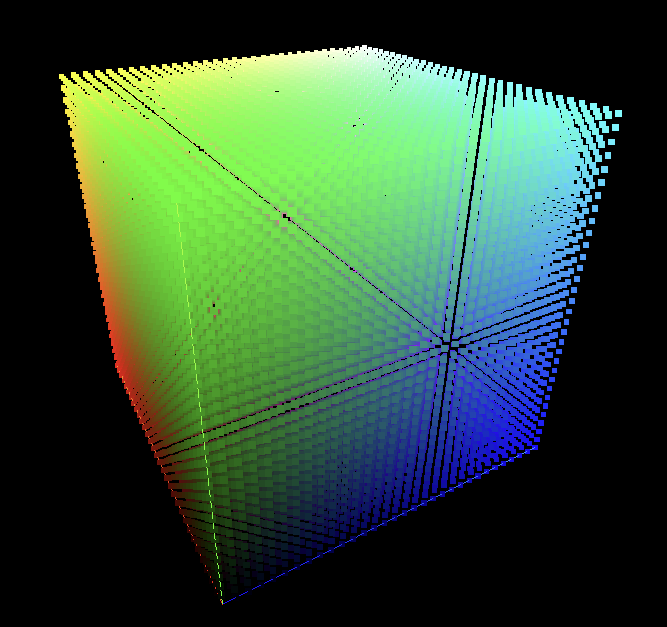
To really understand how the ExG-R algorithm works, visualization is key. I’ve created an interactive 3D color cube that lets you explore the RGB color space dynamically. Each point in the cube represents a unique RGB combination, and its brightness reflects the segmented value based on the weights you choose. By adjusting these weights, you can see in real time how different colors are emphasized or diminished.
For instance, if you set the weights as follows:
- Red = -1
- Green = 2
- Blue = -1
this configuration effectively implements the ExG-R algorithm. It brightens green areas while suppressing other colors—a powerful demonstration of the algorithm’s mechanics.
Try the Interactive 3D Color Cube
Ready to experiment on your own? Check out the interactive 3D color cube visualization by clicking the button below. Play around with the red, green, and blue weight values, create your own segmentation algorithms, and see how the cube responds in real time. It’s a fun, hands-on way to explore color segmentation!
Conclusion
Color segmentation is a cornerstone of image processing with wide-ranging applications—from agricultural monitoring to advanced computer vision. By harnessing the RGB color space and algorithms like ExG-R, we can isolate specific colors with impressive precision. I hope this post—and the interactive 3D visualization—provides you with a clearer understanding of how these techniques work. Feel free to run the script, tweak the weights, and experiment with color segmentation. Happy experimenting!
References
Meyer, G. E., Camargo Neto, J., Jones, D. D., & Hindman, T. W. (2004). Excess green minus excess red: A simple vegetation index for weed detection in crops. Transactions of the ASAE, 47(3), 859-866.